前言 Hexo Butterfly 本身并没有内置「Status / 运行状态 / 在线监测」页面,但我们可以通过 Hexo 自定义页面 + 注入 JS/CSS 的方式,在不动主题核心模板的前提下加上一个 Status 页面。
本教程面向:
准备工作
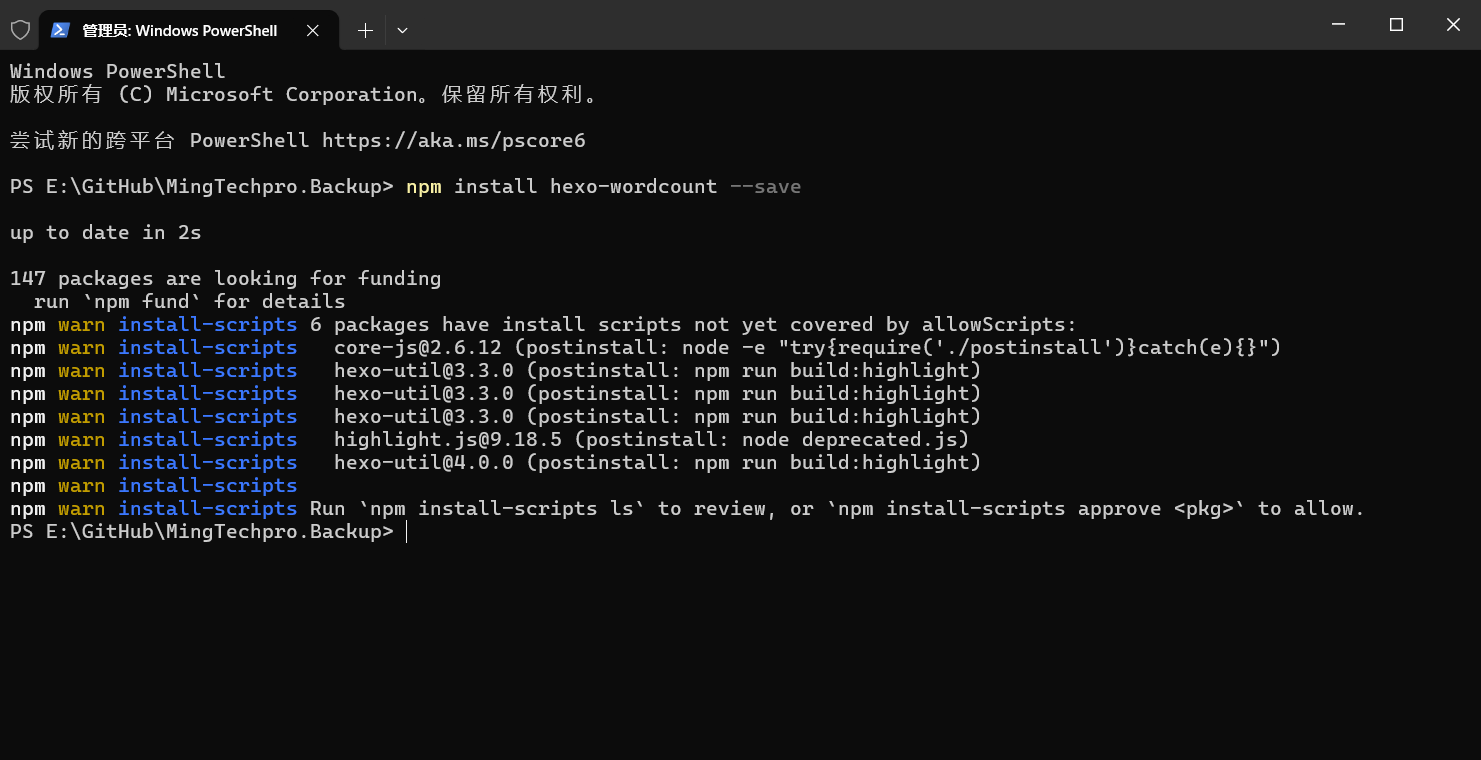
Hexo butterfly 必要配置 安装 hexo-wordcount 字数统计插件
1 npm install hexo-wordcount --save
开启字数统计
编辑 _config.butterfly.yml 或 themes\butterfly\_config.yml 中配置项
1 2 3 4 5 6 7 8 9 wordcount: enable: true post_wordcount: true min2read: true total_wordcount: true
开启不蒜子统计
编辑 _config.butterfly.yml 或 themes\butterfly\_config.yml 中配置项
1 2 3 4 5 busuanzi: site_uv: true site_pv: true page_pv: true
注意: 不蒜子版本要最新版或者 busuanzi@3.6.9 已上,否则 今日总访问量 和 今日访客总数 会显示失败。umami.is 只是不会显示 今日总访问量 和 今日访客总数 。
创建 /status 页 生成 status 文件
在 hexo 工作目录下运行代码,生成 source\status\index.md 文件
编辑 Status 文件 Front-matter 路径:source\status\index.md
1
2
3
4
--- title: 站点状态 date: 2026-09-12 16:24:25 ---
参数
解释
todayPV
【可选】「今日总访问量」模块标题文案,默认:Total visits today
todayUV
【可选】「今日访客总数」模块标题文案,默认:Total visitors today
echarts
是否加载 ECharts 库文件,填写 true 或者 false
创建 status 模板布局 创建 status-info.pug 文件
在 themes\butterfly\layout\includes\ 目录下创建 status-info.pug 文件
1 2 3 4 5 6 7 8 9 10 11 12 13 14 15 16 17 18 19 20 21 22 23 24 25 26 27 28 29 30 31 32 33 34 35 36 37 38 39 40 41 42 43 44 45 46 47 48 49 50 51 52 53 54 55 56 57 58 59 60 61 62 63 64 65 66 67 68 69 70 71 72 73 74 75 76 77 78 79 80 81 82 83 84 85 86 87 88 89 90 91 92 93 94 .status -grid if theme.aside .card_webinfo .runtime_date .stat -card .stat -icon (style="color:#3498db" ) i.fas .fa -clock .stat -meta .stat -label= `${_p('aside.card_webinfo.runtime.name' )} ` .stat -value#status-runtimeshow (data-publishDate=date_xml (theme.aside .card_webinfo .runtime_date )) i.fa -solid.fa -spinner.fa -spin .stat -card .stat -icon (style="color:#95a5a6" ) i.fas .fa -rotate .stat -meta .stat -label= `${_p('aside.card_webinfo.last_push_date.name' )} ` .stat -value#status-last-push-date (data-lastPushDate=date_xml (Date .now ())) i.fa -solid.fa -spinner.fa -spin .stat -card .stat -icon (style="color:#2ecc71" ) i.fas .fa -file-pen .stat -meta .stat -label= `${_p('aside.card_webinfo.article_name' )} ` .stat -value= site.posts .length if theme.wordcount .enable && theme.wordcount .total_wordcount .stat -card .stat -icon (style="color:#27ae60" ) i.fas .fa -file-lines .stat -meta .stat -label= `${_p('aside.card_webinfo.site_wordcount' )} ` .stat -value= totalcount (site) if theme.busuanzi && theme.busuanzi .site_pv .stat -card .stat -icon (style="color:#1abc9c" ) i.fas .fa -chart-line .stat -meta .stat -label= page.todayPV || 'Total visits today' .stat -value#busuanzi_today_pv i.fa -solid.fa -spinner.fa -spin if theme.busuanzi && theme.busuanzi .site_uv .stat -card .stat -icon (style="color:#e74c3c" ) i.fas .fa -user-clock .stat -meta .stat -label= page.todayUV || 'Total visitors today' .stat -value span#busuanzi_today_uv i.fa -solid.fa -spinner.fa -spin if theme.umami_analytics .enable && theme.umami_analytics .UV_PV .site_pv .stat -card .stat -icon (style="color:#e67e22" ) i.fas .fa -eye .stat -meta .stat -label= `${_p('aside.card_webinfo.site_pv_name' )} ` .stat -value#umami-site-pv i.fa -solid.fa -spinner.fa -spin else if theme.busuanzi .site_pv .stat -card .stat -icon (style="color:#e67e22" ) i.fas .fa -eye .stat -meta .stat -label= `${_p('aside.card_webinfo.site_pv_name' )} ` .stat -value#busuanzi_site_pv i.fa -solid.fa -spinner.fa -spin if theme.umami_analytics .enable && theme.umami_analytics .UV_PV .site_uv .stat -card .stat -icon (style="color:#9b59b6" ) i.fas .fa -users .stat -meta .stat -label= `${_p('aside.card_webinfo.site_uv_name' )} ` .stat -value#umami-site-uv i.fa -solid.fa -spinner.fa -spin else if theme.busuanzi .site_uv .stat -card .stat -icon (style="color:#9b59b6" ) i.fas .fa -users .stat -meta .stat -label= `${_p('aside.card_webinfo.site_uv_name' )} ` .stat -value#busuanzi_site_uv i.fa -solid.fa -spinner.fa -spin
创建 status.pug 文件
在 themes\butterfly\layout\ 目录下创建 status.pug 文件
1
2
3
4
5
6
7
8
9
10
11
12
13
14
15
16
17
18
19
20
21
22
23
24
25
26
27
28
29
30
31
32
33
34
35
36
37
extends includes/layout.pug block content - const noCardLayout = ['shuoshuo' , '404' ].includes (page.type ) ? 'nc' : '' - var commentsJsLoad = false mixin commentLoad if page.comments !== false && theme.comments && theme.comments .use - commentsJsLoad = true !=partial ('includes/third-party/comments/index' , {}, {cache : true }) #page (class =noCardLayout) if page.layout === 'status' link (rel="stylesheet" href=url_for ('css/status.css' ) type="text/css" ) if top_img === false && page.title .page -title= page.title .status -wrap .status -wrap-title i.fas .fa -chart-line span= _p ('aside.card_webinfo.headline' ) !=partial ('includes/status-info' , {}, {cache : true }) if page.layout === 'status' script (src=url_for ('js/status.js' ) defer) if page.echarts === true script (src='//cdn.jsdelivr.net/npm/echarts@6.1.0/dist/echarts.min.js' ) .status -content (style="margin-top:1rem;" ) != page.content +commentLoad
创建 status.css 文件
在 source\css\ 目录下创建 status.css 文件
1 2 3 4 5 6 7 8 9 10 11 12 13 14 15 16 17 18 19 20 21 22 23 24 25 26 27 28 29 30 31 32 33 34 35 36 37 38 39 40 41 42 43 44 45 46 47 48 49 50 51 52 53 54 55 56 57 58 59 60 61 62 63 64 65 66 67 68 69 70 71 72 73 74 75 76 77 78 79 80 81 82 83 84 85 86 87 88 89 90 91 92 93 94 95 96 97 98 99 100 101 102 103 104 105 .status-wrap-title { position : relative; padding-bottom : 15px ; font-size : 1.72em ; } .status-grid { display : grid; grid-template-columns : repeat ( auto-fit, minmax (260px , 1 fr) ); gap : 0.8rem ; padding : 0.8rem 0 ; } .stat-card { position : relative; display : flex; align-items : center; gap : 0.8rem ; padding : 1rem 1.2rem ; min-height : 85px ; border-radius : 10px ; background-color : var (--card-bg); box-shadow : 0 2px 10px rgba (0 , 0 , 0 , 0.08 ); border : 1px solid transparent; overflow : hidden; transition : box-shadow 0.25s ease, border-color 0.25s ease; } .stat-card ::before { content : "" ; position : absolute; left : 0 ; top : 50% ; width : 0 ; height : 0 ; background : var (--btn-bg); border-radius : 0 3px 3px 0 ; transform : translateY (-50% ); transition : width 0.25s ease, height 0.25s ease; } .stat-card ::after { content : "" ; position : absolute; bottom : 0 ; left : -100% ; width : 100% ; height : 2px ; background : linear-gradient (90deg , transparent, var (--btn-bg), transparent); } .stat-card :hover { box-shadow : 0 4px 20px rgba (0 , 0 , 0 , 0.1 ); border-color : var (--btn-bg); } .stat-card :hover ::before { width : 3px ; height : 60% ; } .stat-card :hover ::after { animation : light-sweep 0.8s ease forwards; } @keyframes light-sweep { to { left : 100% ; } } .stat-icon { flex : 0 0 40px ; text-align : center; } .stat-icon i { font-size : 1.8rem ; } .stat-meta { flex : 1 ; line-height : 1.3 ; } .stat-label { font-size : 0.95rem ; color : var (--font-color); opacity : 0.8 ; } .stat-value { font-size : 1.25rem ; font-weight : 700 ; color : var (--font-color); } @media (max-width : 768px ) { .status-grid { grid-template-columns : 1 fr; } }
创建 status.js 文件
在 source\js\ 目录下创建 status.js 文件
1 2 3 4 5 6 7 8 9 10 11 12 13 14 15 16 17 18 19 20 21 22 23 24 25 26 27 28 29 30 31 32 33 34 35 36 37 38 39 40 41 42 43 44 45 46 47 48 49 50 51 52 53 54 55 56 (function ( if (location.pathname .replace (/\/+$/ , "" ) !== "/status" ) return ; const addRuntime = ( const $runtimeCount = document .getElementById ("status-runtimeshow" ); if (!$runtimeCount) return ; const publishDate = $runtimeCount.getAttribute ("data-publishDate" ); if (!publishDate) return ; $runtimeCount.textContent = `${btf.diffDate(publishDate)} ${GLOBAL_CONFIG.runtime} ` ; }; const addLastPushDate = ( const $lastPushDateItem = document .getElementById ("status-last-push-date" ); if (!$lastPushDateItem) return ; const lastPushDate = $lastPushDateItem.getAttribute ("data-lastPushDate" ); if (!lastPushDate) return ; $lastPushDateItem.textContent = btf.diffDate (lastPushDate, true ); }; const refreshStatusFn = ( addRuntime (); addLastPushDate (); }; const boot = ( if (window .btf ) { refreshStatusFn (); } }; if (document .readyState === "loading" ) { document .addEventListener ("DOMContentLoaded" , boot); } else { boot (); } })();
将 status 页面加入 Butterfly 导航栏
编辑 _config.butterfly.yml 或 themes\butterfly\_config.yml 中配置项
1
2
3
4
menu: 首页: /#content-inner || fas fa-home 站点状态: /status/ || fas fa-chart-pie
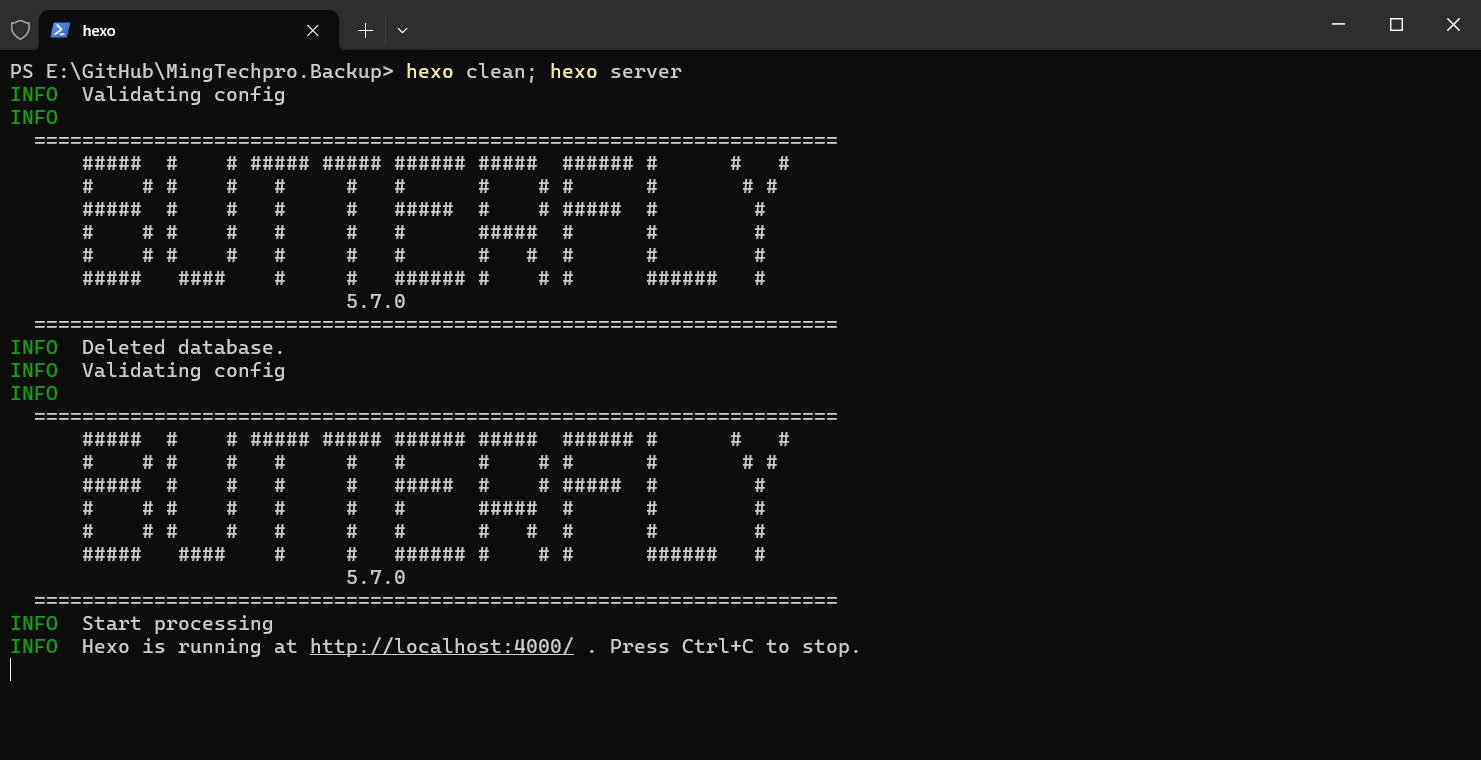
生成 status 页面并预览 status 生成 status 页面
1
2
3
4
# 生成并预览 hexo clean && hexo server # 或者 hexo clean; hexo server
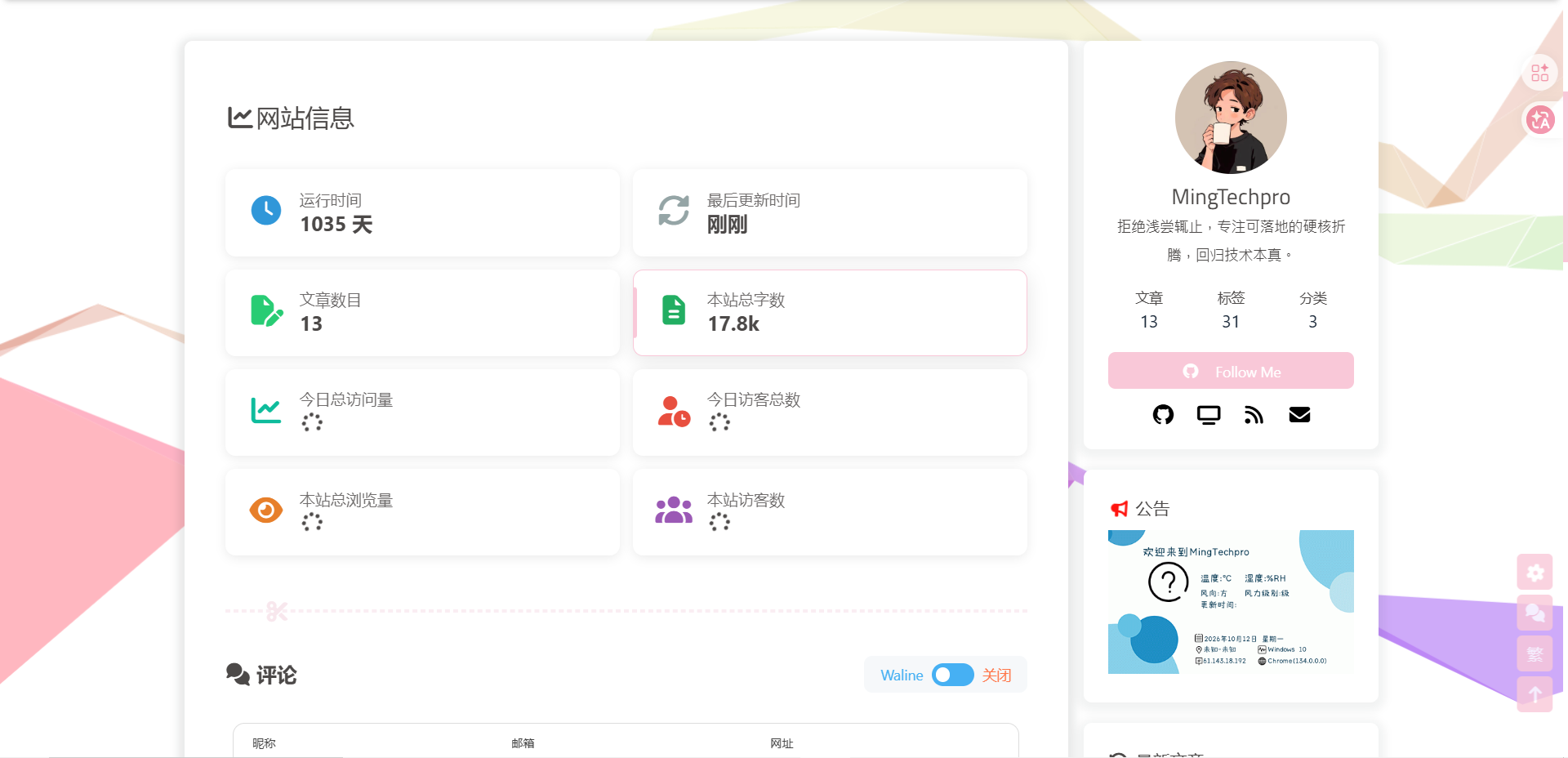
预览 status 页面
总结 本教程基于 Hexo Butterfly ,通过「自定义页面 + Pug 模板 + 专属 CSS/JS」的方式,在不改动主题核心源码的前提下,为博客新增了一个功能完整的 /status/ 站点状态页。
核心实现要点回顾:
页面生成 :使用 hexo new page status 创建独立页面,并通过 Front-matter 自定义字段传递数据模板扩展 :新增 status.pug 布局文件与 status-info.pug 组件,复用 Butterfly 已有的 WebInfo 数据结构数据展示 :整合了 hexo-wordcount (字数统计)、不蒜子 / umami (访问量 & 访客数)、运行时长 与 最后更新时间 等核心指标样式隔离 :通过 status.css 实现卡片网格布局与悬停动效,仅在 status 页面加载,不影响全局性能配置接入 :将页面加入 Butterfly 导航菜单,一键可达
最终效果 :一个视觉统一、数据实时、响应式适配的站点状态面板,既满足了访客对博客运行情况的知情权,又保持了主题的整洁与可升级性。
💡 进阶提示 :如需接入第三方服务(如 UptimeRobot 监控、GitHub Actions 心跳),只需在 source/status/index.md 的正文区域(status-content 块)嵌入 iframe 或 JS 即可,无需修改模板结构。

 微信赞赏
微信赞赏 支付宝
支付宝